[QuickNet] - P4 - Inside Local, Inside Global, Outside Local, and Outside Global Concepts in NAT
Network Address Translation (NAT) is a crucial networking technique that allows multiple devices on a local network to access external networks using a single public IP address. Understanding the different types of IP addresses involved in NAT is essential for grasping how it functions and ensuring effective network management. This blog post will break down the concepts of Inside Local, Inside Global, Outside Local, and Outside Global IP addresses, providing clear definitions and practical examples.
![[QuickNet] - P4 - Inside Local, Inside Global, Outside Local, and Outside Global Concepts in NAT](https://lepuchin.com/uploads/images/image_750x_66a64c478301e.jpg)
Key Concepts in NAT
-
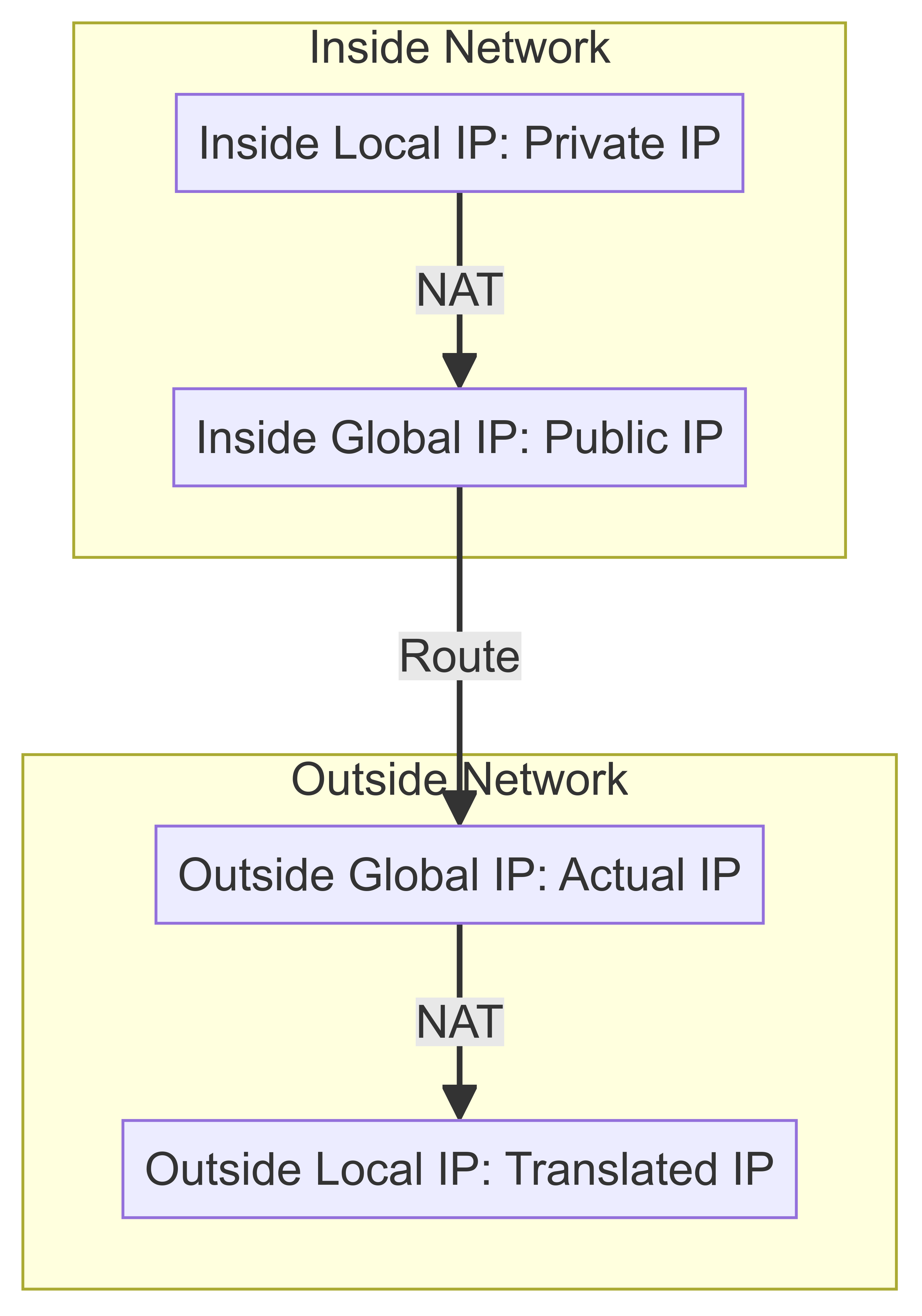
Inside Local IP:
- Definition: This is the private IP address assigned to a device within the internal network.
- Example: An internal device like a laptop might have an IP address of 192.168.1.10. This address is used for communication within the local network.
- Explanation: Inside Local IP addresses are not routable on the internet and are unique within the internal network but not necessarily globally unique.
-
Inside Global IP:
- Definition: This is the public IP address assigned by the ISP to the NAT device (typically a router) that represents the internal network to the outside world.
- Example: When the laptop with an Inside Local IP of 192.168.1.10 communicates with an external server, the NAT device translates this to an Inside Global IP such as 203.0.113.5.
- Explanation: The Inside Global IP is globally unique and routable on the internet. It enables devices in the internal network to communicate with external networks using a single public IP address.
-
Outside Global IP:
- Definition: This is the public IP address assigned to an external device or server by its own ISP.
- Example: An external web server might have an IP address of 198.51.100.7. This is the address used to identify the server on the internet.
- Explanation: The Outside Global IP is globally unique and identifies an external device or server in communications initiated by devices inside the local network.
-
Outside Local IP:
- Definition: This is the IP address of an external device as perceived from the internal network, which may be translated by the NAT device.
- Example: When the internal laptop communicates with the external web server, the NAT device might map the external server’s Outside Global IP (198.51.100.7) to an Outside Local IP such as 192.168.1.20.
- Explanation: The Outside Local IP may be used for translating and routing purposes within the internal network, providing a way for the internal devices to keep track of external communications.
How NAT Works
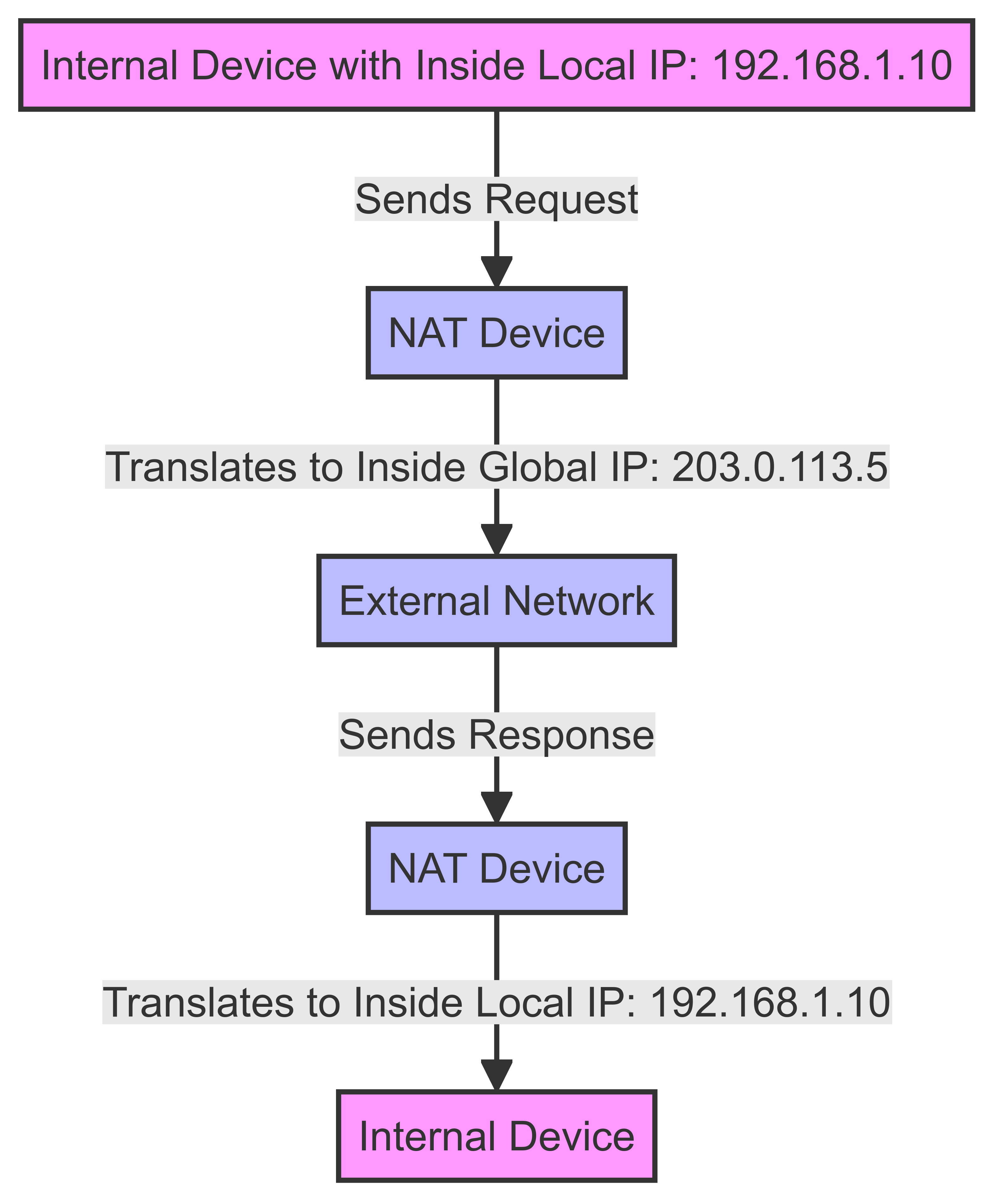
Here’s a step-by-step example to illustrate the process:
-
Internal Communication Initiation:
- A device inside the network (e.g., a laptop with an Inside Local IP of 192.168.1.10) wants to access a website on the internet.
-
NAT Translation:
- The NAT device (router) receives this request and translates the Inside Local IP (192.168.1.10) to the Inside Global IP (203.0.113.5), which is the router's public IP address.
-
Routing to the External Network:
- The request is sent out to the internet with the source IP address as the Inside Global IP (203.0.113.5).
-
Response from the External Server:
- The external server (with an Outside Global IP of 198.51.100.7) receives the request and sends a response back to the Inside Global IP (203.0.113.5).
-
NAT Device Translates the Response:
- The NAT device translates the response's destination address from the Inside Global IP (203.0.113.5) back to the Inside Local IP (192.168.1.10) and forwards it to the originating device.
-
Internal Device Receives the Response:
- The laptop receives the response and continues the communication process.
Practical Benefits of NAT
- IP Address Conservation: NAT helps conserve the number of public IP addresses needed by an organization.
- Security: By masking internal IP addresses, NAT adds a layer of security, making it harder for external entities to directly access internal devices.
- Simplified Network Management: NAT allows changes to internal IP addresses without affecting external communications.
Basic NAT Configure on a Cisco router
Step 1 - Enter Global Configuration Mode
Enter the global configuration mode to make changes that affect the router as a whole.
Router> enable
Router# configure terminal
Step 2 - Define Inside and Outside Interfaces
Specify which interfaces will be used for the inside and outside NAT translation.
Router(config)# interface gigabitEthernet 0/0
Router(config-if)# ip nat inside
Router(config-if)# exit
Router(config)# interface gigabitEthernet 0/1
Router(config-if)# ip nat outside
Router(config-if)# exit
Replace gigabitEthernet 0/0 and gigabitEthernet 0/1 with the actual interfaces on your router.
Step 3 - Configure a Standard Access List
Create an access list to permit the IP addresses that need NAT.
Router(config)# access-list 1 permit 192.168.1.0 0.0.0.255Replace 192.168.1.0 0.0.0.255 with the actual IP address range of your internal network.
Step 4 - Configure NAT Overload (PAT)
Configure NAT overload to allow multiple internal IP addresses to share a single external IP address.
Router(config)# ip nat inside source list 1 interface gigabitEthernet 0/1 overloadReplace gigabitEthernet 0/1 with the actual interface connected to the external network.
Step 5 - Verify Configuration
- Show NAT Translations: Displays the current NAT translations.
Router# show ip nat translations - Show Running Configuration: Displays the current configuration including NAT settings.
Router# show running-config
These steps will configure basic NAT on a Cisco router, allowing internal devices to communicate with external networks using a single public IP address. If you have a specific network topology or need further customization.
NAT Classification & Advanced Configuration
1. Static NAT
- Description: Maps a single private IP address to a single public IP address. This type of NAT is typically used when a device needs to be accessible from outside the network using a consistent IP address.
- Configuration:
This command maps the internal IP address
Router(config)# ip nat inside source static 192.168.1.10 203.0.113.2192.168.1.10to the external IP address203.0.113.2.
2. Dynamic NAT
- Description: Maps a private IP address to a public IP address from a pool of public IP addresses. This type of NAT is used when you have more private IP addresses than public IP addresses but still need a direct mapping.
- Configuration:
This command creates a pool of public IP addresses (
Router(config)# ip nat pool NAT_POOL 203.0.113.3 203.0.113.10 netmask 255.255.255.0 Router(config)# access-list 1 permit 192.168.1.0 0.0.0.255 Router(config)# ip nat inside source list 1 pool NAT_POOL203.0.113.3to203.0.113.10) and maps internal IP addresses (192.168.1.0/24) to this pool.
3. PAT (Port Address Translation) or NAT Overload
- Description: Maps multiple private IP addresses to a single public IP address or a few addresses by using different ports. This type of NAT is typically used when you have many private IP addresses but only one or a few public IP addresses.
- Configuration:
This command maps internal IP addresses (
Router(config)# access-list 1 permit 192.168.1.0 0.0.0.255 Router(config)# ip nat inside source list 1 interface gigabitEthernet 0/1 overload192.168.1.0/24) to the external IP address of the interfacegigabitEthernet 0/1using port numbers to distinguish the connections.
Summary of NAT Types
| NAT Type | Description | Example Command |
|---|---|---|
| Static NAT | One-to-one mapping of internal to external IP | ip nat inside source static 192.168.1.10 203.0.113.2 |
| Dynamic NAT | Many-to-many mapping from a pool of IPs | ip nat pool NAT_POOL 203.0.113.3 203.0.113.10 netmask 255.255.255.0ip nat inside source list 1 pool NAT_POOL |
| PAT (NAT Overload) | Many-to-one mapping using ports | ip nat inside source list 1 interface gigabitEthernet 0/1 overload |
Conclusion
Understanding the distinctions between Inside Local, Inside Global, Outside Local, and Outside Global IP addresses is fundamental for anyone working with NAT. These concepts help in configuring NAT correctly, troubleshooting network issues, and ensuring secure and efficient communication between internal and external networks. By grasping these principles, network administrators can optimize the use of NAT in their environments, improving both functionality and security.
----------------------------------------------------
[QuickNet] - P3 - Route Summarization
[QuickNet] - P2 - How to Determine if Two IP Addresses Belong to the Same Subnet
What's Your Reaction?








![[Show Running-Config] - P1 - Configure EtherChannel](https://lepuchin.com/uploads/images/image_650x433_6623d1af3b338.jpg)
![[QuickNet] - P1 - Firewalls: A Castle Gatekeeper](https://lepuchin.com/uploads/images/image_650x433_6663d58cd8282.jpg)





![[Security Brief] - P16 - DoubleClickjacking: A New Clickjacking Attack](https://lepuchin.com/uploads/images/image_750x415_677943a1332cb.jpg)
![[CyberChats: Palkia & Charmander] - Season B - P8 - Baseline Security Controls](https://lepuchin.com/uploads/images/image_750x415_6692e1959612c.jpg)
![[Security Brief] - P12 - Fragment Attack](https://lepuchin.com/uploads/images/image_750x415_657fb81c697c7.jpg)
![[CyberChats: Palkia & Charmander] - Season A - P1 - Access Control](https://lepuchin.com/uploads/images/image_750x415_65355910438ac.jpg)

