Web Application Penetration Testing: Steps, Methods, & Tools
Web Application Penetration Testing: Steps, Methods, & Tools
Web Application Penetration Testing: Steps, Methods, & Tools
--------------------------------------------------
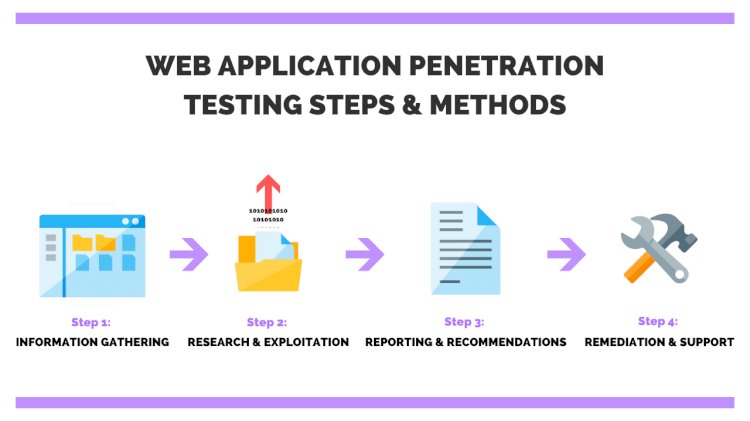
Step 1: Information Gathering (Reconnaissance)
As it provides you with a wealth of information to identify vulnerabilities easily and exploit them later.
 Two types of reconnaissance:
-
Active Reconnaissance

-
Passive Reconnaissance

Passive Reconnaissance
Gathering information that is already available on the internet and doing so without directly interacting with the target system is called passive reconnaissance.
Most research in this phase is done online using various websites, beginning with Google.
For example, if subdomains of a certain website are of interest, you can use the following syntax to narrow down the Google search results: “site:*.domain.com”.
Active Reconnaissance
Active reconnaissance directly probes the target system and retrieves an output.
Examples of active reconnaissance include:
Fingerprinting the web application-> Tool: Nmap, Wireshark
Using the Shodan, Censys (both are search engine) Performing a DNS forward and reverse lookup (With a forward DNS lookup, the DNS is queried for the IP address of a certain hostname, a reverse DNS lookup returns the hostname of an IP address.)-> Tool: BurpSuite, dns lookup, ping
A DNZ zone transfer (because DNS Zone Transfer used to replicate DNS data across a number of DNS servers or to back up DNS files.)-> nslookup, dig, maltego, dnenum, dnsrecon
Identifying Related External Sites (because traffic flowing between external sites and the target site)-> Tool: BurpSuite
Inspect HEAD and OPTIONS HTTP requests-> Tool: BurpSuite
It is vital to document everything in an organized manner during your investigation gathering phase.
This will give you a baseline from which you will continue to further study the target and hopefully find vulnerabilities in the system to later exploit.
Step 2: Research And Exploitation
The entire penetration testing process depends deeply on the reconnaissance phase and the discovered vulnerabilities. Finding the right exploit and gaining access into the system is far more easier with a thorough investigation.
 For open source web application vulnerability scannersFor open source web penetration testing:
Don't you know BurpSuite with ZAP can work along with each other very well?
There are actually more and more tools I haven't listed here while you are doing pentest on the website. For example, ettercap for MITM or password cracking like Hydra,.... You discovered out by yourself.
Sometimes applications use 3rd party tools for certain functionalities. This exposes the whole application to the same risk the 3rd party tool has. Look for publicly available vulnerabilities and exploits in software vendors the application uses and test them out.
Step 3: Reporting And Recommendations
The structure of the report should be clear and concise with adequate amount of data to support your findings. By writing down the successful exploits and categorizing them by criticality, you will help the client company focus its efforts in fixing the most critical parts of their system.
Step 4: Remediation And Ongoing Support
Many companies find themselves not able to remediate all the vulnerabilities a penetration test revealed. It is best practice to mitigate critical and high vulnerabilities first and focus on the medium and low afterwards.
Many penetration testing companies offer a re-test as part of their contract and will provide you with a secondary penetration test to verify the mitigated vulnerabilities found in the previous test.
In conclusion
If the application handles some credit card data, personal information or even health records, it would be in a company’s best interest to perform annual web application penetration testing in order to meet regulatory compliance that most of the data requires.
With varying tools to choose from, web application penetration testing has developed a much more structured approach to automated and manual testing. Choosing any open source security solutions is highly recommended with the availability of commercial versions of the same tool with upgraded capabilities.
 1 more thing, there are lots of different ways and steps to perform the web penetration testing depending on different authors. The whole post above is just a personal opinion for you to have something to refer to. And of course, you will develop a lot more small details when you actually get into web penetration testing. Remember to create a file for yourself to record your entire process (including what is and what is not) so you can use them later as well as show them again for newcomers
  .
.Source: purplesec
What's Your Reaction?








![[PENTEST TOOLS] Complete free Bug Bounty tool list for termux and kali linux](https://lepuchin.com/uploads/images/image_650x433_601351fe1235b.jpg)







![[Security Brief] - P16 - DoubleClickjacking: A New Clickjacking Attack](https://lepuchin.com/uploads/images/image_750x415_677943a1332cb.jpg)
![[CyberChats: Palkia & Charmander] - Season B - P8 - Baseline Security Controls](https://lepuchin.com/uploads/images/image_750x415_6692e1959612c.jpg)
![[Security Brief] - P12 - Fragment Attack](https://lepuchin.com/uploads/images/image_750x415_657fb81c697c7.jpg)
![[CyberChats: Palkia & Charmander] - Season A - P1 - Access Control](https://lepuchin.com/uploads/images/image_750x415_65355910438ac.jpg)

