Fix lỗi windows 10 tự sleep
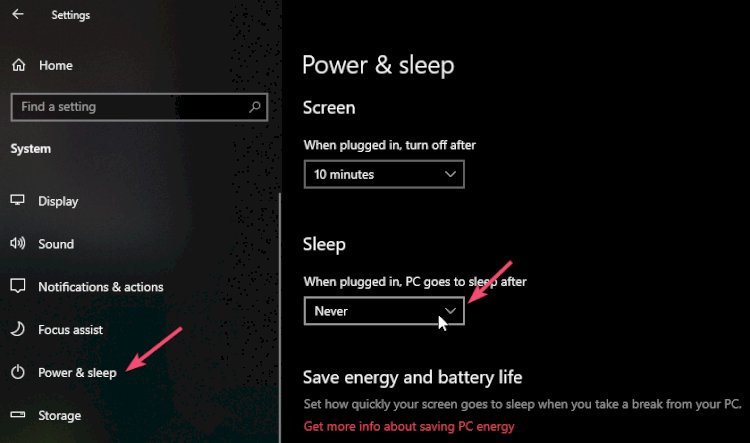
Một số dòng máy có thể sẽ gặp phải vấn đề tự khởi động lại, tự sleep khi đang sử dụng sau khi cài đặt windows 10. Có thể là do thiếu cập nhật driver dẫn đến xung đột hoặc không hỗ trợ đầy đủ.
Để xử lý vấn đề này ta có thể thực hiện các bước sau:
Bước 1: Update tất cả driver tự động bằng phần mềm Driver Easy.
Bước 2: Chỉnh sửa regedit như sau:
1. Click on the windows icon
2. Type regedit
3. Right-click on regedit icon, click Run as administrator
4. Go to HKEY_LOCAL_MACHINE\SYSTEM\CurrentControlSet\Control\Power\PowerSettings\238C9FA8-0AAD-41ED-83F4-97BE242C8F20\7bc4a2f9-d8fc-4469-b07b-33eb785aaca0
5. Double click on Attributes
6. Enter number 2.
7. Go to Advanced power settings (click on Windows button, write power options, click on Power Options, in the selected plan click on the Change plan settings, click on the Change advanced power settings).
8. Click on the Change settings that are currently unavailable
9. Click Sleep, then System unattended sleep timeout, then change these settings from 2 Minutes to 20 for example.
What's Your Reaction?















![[Security Brief] - P16 - DoubleClickjacking: A New Clickjacking Attack](https://lepuchin.com/uploads/images/image_750x415_677943a1332cb.jpg)
![[CyberChats: Palkia & Charmander] - Season B - P8 - Baseline Security Controls](https://lepuchin.com/uploads/images/image_750x415_6692e1959612c.jpg)
![[Security Brief] - P12 - Fragment Attack](https://lepuchin.com/uploads/images/image_750x415_657fb81c697c7.jpg)
![[CyberChats: Palkia & Charmander] - Season A - P1 - Access Control](https://lepuchin.com/uploads/images/image_750x415_65355910438ac.jpg)

